Hearing Aid Batteries Guide | BMC Medical
A practical step-by-step guide to hearing aid batteries guide, including preparation, instructions, common issues, tips, and next steps.
Hearing Aid Batteries Guide
This guide provides a complete, step-by-step process for safely and effectively managing your hearing aid batteries. Understanding how to choose the correct size, properly activate a new battery, and troubleshoot common issues is essential for consistent hearing aid performance. Following these instructions will help you maximise battery life, prevent damage to your device, and ensure you have reliable hearing support. This guide is for users of non-rechargeable, zinc-air hearing aid batteries.
Fast Answer
- Battery Type: Most are zinc-air; match the colour-coded size to your device.
- Activation: Remove the tab and wait 3-5 minutes before inserting.
- Orientation: Insert with the flat, positive ('+') side facing up.
- Safety: Keep batteries away from children and pets; they are a swallowing hazard.
Before You Start
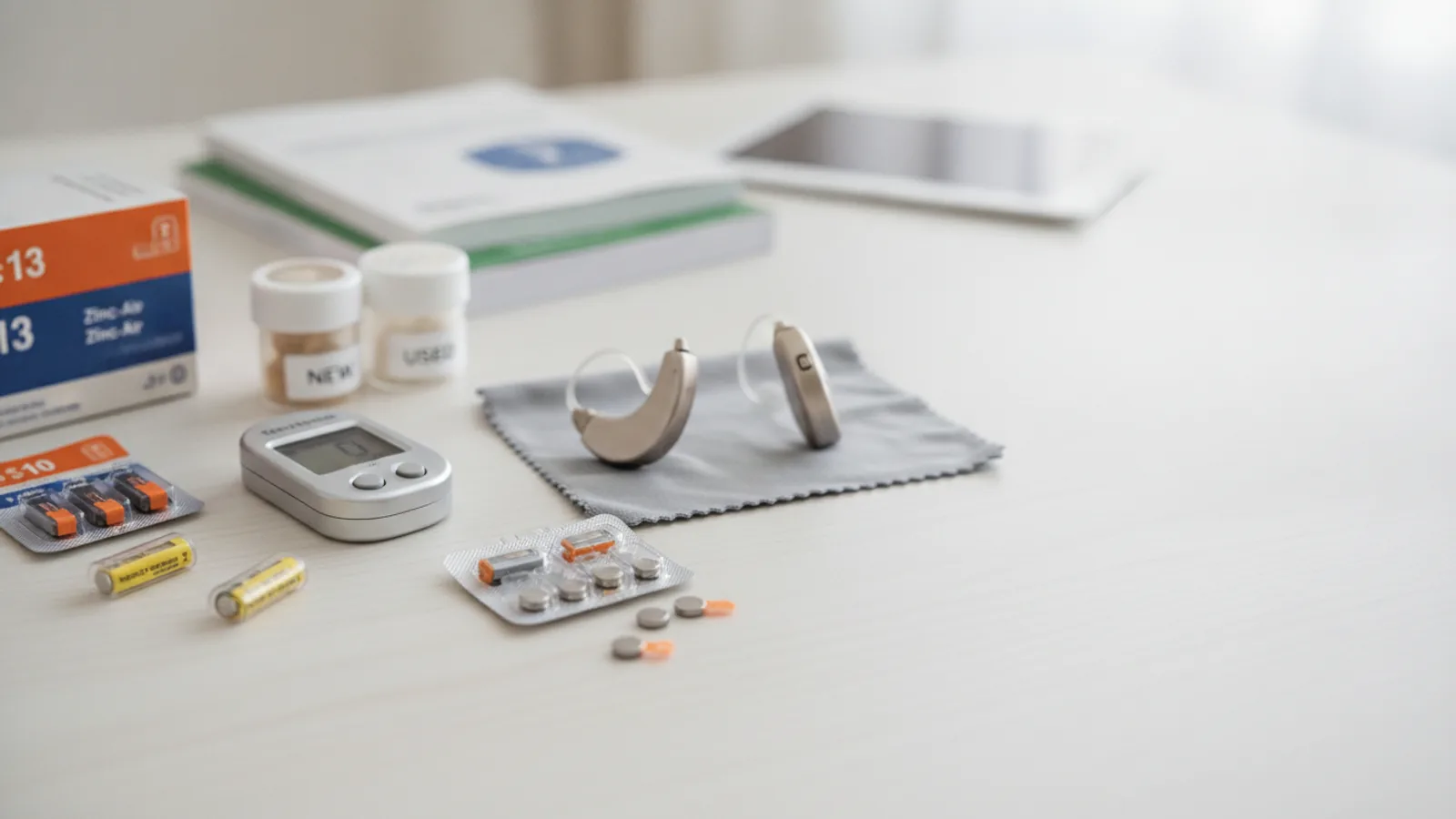
Preparation is key to a smooth and safe battery change. Gather your materials in a clean, stable, and well-lit area to minimise the risk of dropping or losing small components.
What You Need
- Your hearing aid(s).
- A new, sealed pack of the correctly sized hearing aid batteries.
- A clean, dry, and flat surface, such as a table. Laying down a soft cloth or microfibre towel is recommended to prevent the hearing aid from bouncing if dropped.
- Clean and dry hands. Oils and dirt from your skin can interfere with battery contacts.
Safety, Timing, or Context Checks
- Verify Battery Size: Double-check that the new battery's size and colour code match the requirements in your hearing aid's user manual or on the old battery packaging.
- Check Expiry Date: Ensure the batteries are not past their expiry date, which is printed on the package. Expired batteries may have reduced performance or leak.
- Work in a Secure Location: Avoid changing batteries over a sink or a floor with deep-pile carpet where a dropped battery could be easily lost or damaged.
Step-by-Step Instructions
Identify the Correct Battery Type
Most disposable hearing aid batteries are 'zinc-air' type. They are activated by exposure to oxygen. These batteries are standardised by size and use a universal colour-coding system to make identification simple. Check your hearing aid's manual to confirm the size you need.
- Size 10: Yellow sticker
- Size 312: Brown sticker
- Size 13: Orange sticker
- Size 675: Blue sticker
Keep the batteries in their original dial packaging until you are ready to use one. This protects them from short-circuiting if they touch metal objects like keys or coins in a pocket or purse.
Prepare Your Workspace and Hearing Aid
Sit at a clear table or desk, preferably with a soft cloth laid down. This provides a stable surface and cushions the hearing aid if you accidentally drop it. Ensure you have adequate lighting to see the small battery and compartment markings clearly. Turn the hearing aid off before you begin. For most models, this is done by opening the battery door.
Remove the Old Battery
Carefully open the battery compartment door on your hearing aid. This is typically a small hinged door that swings open. On some behind-the-ear (BTE) models, you may need to use a fingernail in a small slot to gently pry it open. The depleted battery should fall out easily or can be tipped out. If it is stuck, you can use the magnetic end of a hearing aid multi-tool, but never use a sharp metal object like a pin or tweezers, as this could scratch and damage the battery contacts.
Activate the New Zinc-Air Battery
This is the most critical step for maximising battery life. Zinc-air batteries are powered by a reaction between zinc and the oxygen in the air. A factory-sealed sticker covers tiny holes in the battery surface to keep it inactive.
Remove a single new battery from the packaging. Peel off the protective sticker on the flat side of the battery. Once the sticker is removed, place the battery on your clean, dry surface and wait for 3 to 5 minutes. This allows sufficient air to enter and fully activate the chemical ingredients inside. Do not skip this waiting period.
Insert the New Battery Correctly
Pick up the activated battery. Examine the battery compartment for a small marking, often a red '+' symbol, which indicates how the battery should be oriented. The battery itself has a completely flat side, which is the positive ('+') side, and a slightly rounded side, which is the negative ('-') side. In almost all hearing aids, the flat, positive side should face upwards, towards the battery door.
Gently place the battery into the compartment. It should fit snugly and sit flat without any force. If you feel resistance, do not force it. The battery is likely upside down or is the incorrect size.
Close the Door and Test the Hearing Aid
Once the battery is correctly seated, gently swing the battery door closed until it clicks shut. Do not slam it. A properly seated battery will allow the door to close with minimal effort. If the door does not close easily, re-open it and check the battery's orientation again.
After closing the door, the hearing aid should power on. Many digital hearing aids play a short musical tune or a series of beeps to indicate they are starting up. To test it, you can either put the hearing aid in your ear to listen for the startup sound or cup it in your hand and listen for a slight whistling feedback, which confirms the microphone and receiver are working.
Dispose of the Old Battery Safely
Used hearing aid batteries should not be thrown in your household waste bin. They contain materials that can be harmful to the environment if sent to landfill. In the UK, you can recycle batteries at designated collection points.
Collect your used batteries in a small, safe container. You can find battery recycling bins at most large supermarkets, some local council recycling centres, chemists, and often at your audiologist's clinic. This is a safe and environmentally responsible way to handle battery disposal.
Quick Reference: Battery Codes and Lifespan
| Size / Colour Code | Typical Device Type | Estimated Lifespan |
|---|---|---|
| Size 10 (Yellow) | Completely-in-Canal (CIC), Invisible-in-Canal (IIC) | 3-7 days |
| Size 312 (Brown) | In-the-Canal (ITC), Receiver-in-Canal (RIC), some BTE | 3-10 days |
| Size 13 (Orange) | Behind-the-Ear (BTE), In-the-Ear (ITE) | 6-14 days |
| Size 675 (Blue) | High-power BTE, Cochlear Implants | 9-20 days |
Common Problems When Changing Hearing Aid Batteries
The Hearing Aid Is Dead or Sounds Weak After Changing the Battery
This is a common issue with several potential causes. Systematically check the following:
- Activation Time: Did you wait the full 3-5 minutes after removing the sticker? If not, the battery may not be fully powered. Try removing it and letting it sit for a few more minutes.
- Battery Orientation: Open the door and confirm the flat '+' side is facing up. It is very easy to insert it upside down by mistake.
- Faulty Battery: Occasionally, you may get a faulty battery in a pack. Try activating and inserting another new battery from the same package.
- Dirty Contacts: Open the battery door and look at the metal contacts inside. If you see any dirt, wax, or corrosion, gently clean them with a dry, clean cloth or a hearing aid cleaning brush. Do not use water or solvents.
- Blocked Sound Port: The issue may not be the battery. Check that the sound outlet and microphone ports on your hearing aid are not blocked with earwax. Clean them according to the manufacturer's instructions.
The Battery Door Will Not Close
Do not force the door shut. This can break the delicate hinge or casing. This problem is almost always caused by one of two things: the battery is inserted upside down, or you are using the incorrect battery size. Open the compartment, remove the battery, and carefully check both its orientation and its size against the old battery or the user manual.
The Battery Life Seems Unusually Short
Battery drain depends heavily on the hearing aid's features, your level of hearing loss, and hours of use per day. However, if you notice a sudden drop in battery life, consider these factors:
- Streaming: Using Bluetooth to stream audio from a phone, TV, or other device consumes significantly more power than standard amplification. More streaming means shorter battery life.
- Environmental Factors: Cold, dry environments can reduce battery performance. Low humidity causes the battery's electrolyte to dry out faster.
- Device Setting: A change in your hearing aid's programming by your audiologist (e.g., increased power) can affect battery drain.
- Hearing Aid Malfunction: In rare cases, a sudden drop in battery life can signal an internal issue with the hearing aid that requires servicing. If the problem persists across multiple packs of fresh batteries, contact your audiologist.
Advanced Tips for Hearing Aid Batteries
How to Maximise Battery Lifespan
- Store Correctly: Keep your spare batteries at a consistent room temperature in their original packaging. Avoid storing them in hot places like a car's glove compartment or in a cold refrigerator.
- Open the Door at Night: When you take your hearing aids out for the night, open the battery door completely. This does two things: it ensures the hearing aid is fully off and not drawing power, and it allows any moisture that has built up during the day to evaporate, which helps prevent corrosion.
- Wash Your Hands: Always wash and thoroughly dry your hands before handling batteries. Grease and dirt can transfer to the battery contacts and impede the electrical connection.
- Buy as Needed: Hearing aid batteries have a long shelf life, but it is not infinite. Avoid stockpiling years' worth of batteries. It's better to purchase a supply that will last you for a few months to ensure you are always using fresh stock.
A Note on Rechargeable Hearing Aids
While this guide focuses on disposable zinc-air batteries, it is worth noting that rechargeable hearing aids are becoming increasingly common. These devices use integrated lithium-ion batteries and are charged by placing them in a dedicated charging case, typically overnight. They eliminate the need for regular battery changes but require access to a power source for daily charging. If you find handling small batteries difficult, a rechargeable model may be a consideration to discuss with your audiologist.
Hearing Aid Batteries Guide FAQ
What should I do if a person or pet swallows a hearing aid battery?
Treat this as a medical emergency. A swallowed battery can cause severe internal burns and tissue damage in as little as two hours. Go immediately to the nearest Accident & Emergency (A&E) department. Do not induce vomiting or give food or drink unless instructed by a medical professional. If possible, bring the battery packaging with you to help medical staff identify the battery type and chemistry.
Can I "reactivate" a dead battery by putting the sticker back on?
No. Once the zinc-air reaction has started, it cannot be stopped. Putting the sticker back on will not preserve or recharge the battery. Likewise, opening the door at night saves power by turning off the device, but it does not stop the battery's chemical reaction, which continues at a very low rate until it is depleted.
Why does my hearing aid sometimes give a low-battery warning and then work again for a while?
This can happen as a zinc-air battery nears the end of its life. Under a high power demand (like in a noisy environment or while streaming), the voltage can temporarily drop, triggering the warning. When the power demand lessens, the voltage recovers slightly, and the hearing aid functions again for a short time. However, this is a reliable sign that the battery needs to be replaced very soon.
Is it safe to carry spare batteries in my pocket?
It is not recommended to carry loose batteries in a pocket or purse. If a battery comes into contact with a metal object like keys or coins, it can short-circuit, draining its power rapidly and potentially causing it to overheat. Always use a dedicated battery caddy or keep them in their original dispenser packaging for safe transport.
Final Checklist for Hearing Aid Batteries
- Confirm you have the correct battery size by checking the colour code (Yellow=10, Brown=312, Orange=13, Blue=675).
- Work on a clean, stable surface with good lighting.
- Wash and dry your hands before handling batteries.
- After removing the tab from a new battery, wait a full 3 to 5 minutes before inserting it.
- Ensure the flat, positive ('+') side of the battery is facing up when you insert it.
- Close the battery door gently and listen for the hearing aid to power on.
- Store spare batteries in their original packaging at room temperature.
- Keep all batteries, new and used, safely out of the reach of children and pets.
- Collect used batteries for responsible recycling.